The Civil Service Commission (CSC) provides an easy way for examinees to check their examination results online through the Online Career Service Examination Result Generation System (OCSERGS). Follow this simple step-by-step guide to verify your results accurately.
Step-by-Step Guide
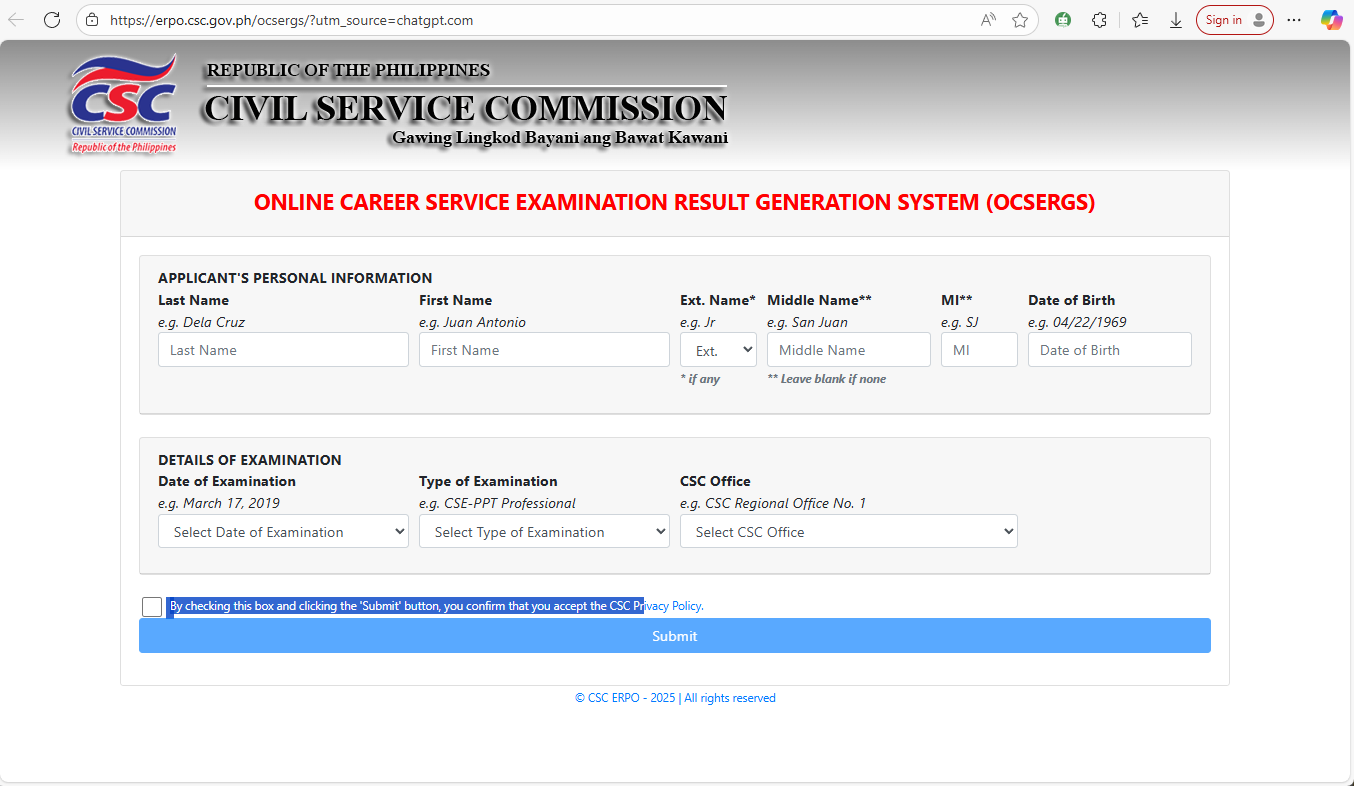
- Go to the OCSERGS Website: Visit https://erpo.csc.gov.ph/ocsergs.
- Enter Your Last Name: Make sure there are no extra spaces or misspellings.
- Enter Your First Name: Ensure accuracy and no unnecessary spaces.
- Provide Your Extension Name: If none, leave blank.
- Input Your Middle Initial: Do not add a period (use “D” not “D.”).
- Enter Your Date of Birth: Use the format MM/DD/YYYY (e.g., 03/07/1999).
- Select the Date of Examination: Choose the correct date from the dropdown.
- Select the Type of Examination: Choose Professional or Sub-Professional.
- Choose the CSC Regional Office: Select the region where you took your exam.
- Tick the Privacy Policy Box: Confirm acceptance of the CSC Privacy Policy.
- Click “Submit”: Review your details before clicking the submit button.
⚠️ Reminder: If your information cannot be found in the database, double-check your entries. If they are correct, please contact your CSC Regional or Field Office.
Visit the CSC official website and click “Contact Us” for office details.Alternatively, you can send a message to the official CSC Facebook page of your province or region.
Final Tip
Checking your Civil Service Exam result online is quick and easy, but accuracy is key. Review every entry before submitting your details to avoid errors. Good luck, and may your efforts bear fruit!